
Turn a brain dump into a clear page.
Paste the messy version of your idea. Explore it, and Flesh It Out connects the pieces, maps them out, points out what's missing and fills the gaps with assumptions you can check. Or convey it, and get a clean page for someone else. Either way you get a link to send.
From a brain dump to this
These are real notes, and the real page Flesh It Out made from them in about two minutes.
What you write
ok so brain dump for the community garden thing
- we got the lot on Elm st from the city, 1 yr lease, free, renewable if we "maintain it"
- need: raised beds (maybe 12?), water - there's a hydrant but city says we need a backflow thing, tool shed
- money: $800 from the neighbourhood assoc, maybe a bake sale, Home Depot does community grants?
- people: me, Priya (knows plants), Dev has a truck, the Hendersons said maybe
- open q: who gets plots? first come? lottery? kids school wants 2 beds
- worried about vandalism, last year someone wrecked the library box
- timeline: build in april, plant by mid may
- should we do a launch day? bbq?
What you get
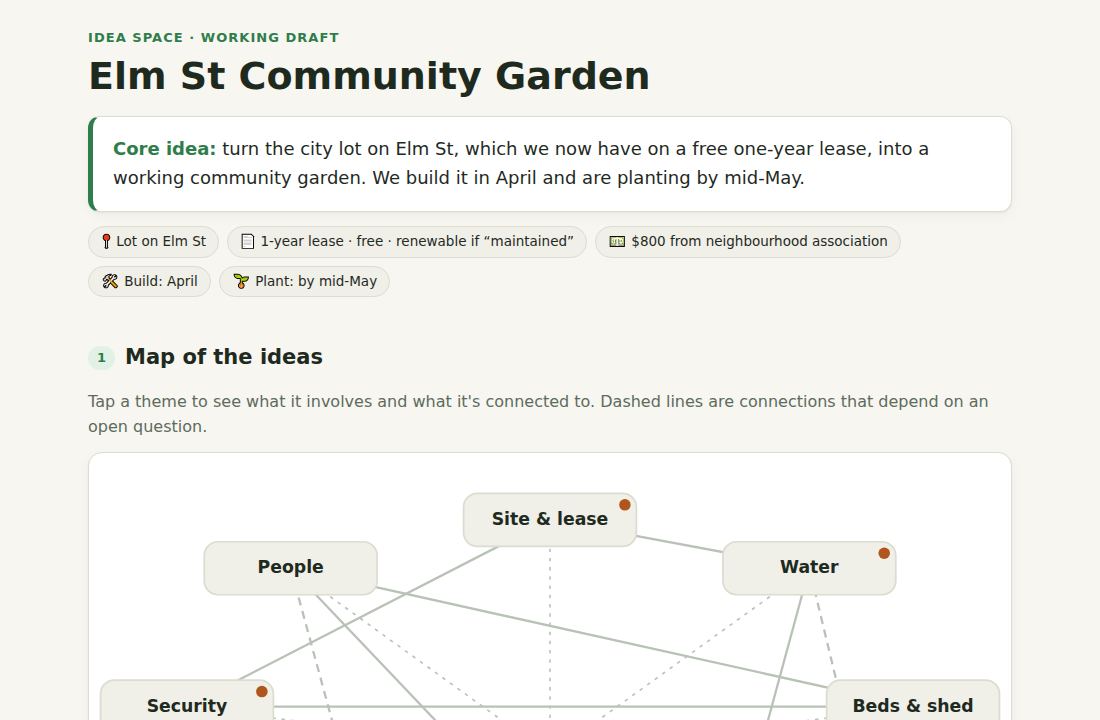
It goes on with a card per theme, what's decided and what's open, the risks, a timeline and a checklist of next steps.
How it works
No templates to fill in. Write the way you think, and let the page do the organizing.
Dump it
Paste notes, half-sentences, a meeting's worth of thoughts. Don't tidy it up first.
Explore or convey
Explore to think it through. Convey to lay it out as a briefing, a build plan, a meeting recap or a page you describe. You watch the page being written.
Comment, then send
Add comments, or correct the page's assumptions, and you get a new version with its own link. Share it in Slack, email or a text.
Two ways to use it
Explore when you're still working the idea out. Convey when you know what you think and need someone else to get it.
Explore
Help me think.
For an idea that's still taking shape. The page reflects on your notes before it organizes them:
- The idea in one line, in your terms
- What it rests on: the assumptions your notes take for granted
- How the parts connect, drawn out in diagrams, timelines and maps
- Tensions, risks and gaps
- Adjacent ideas worth a look
- The assumptions it made to fill your gaps, for you to check
It's told not to make up facts about your situation, and to say what it's assuming. Correct any assumption that's wrong and get the next version. How to brainstorm with AI without losing your own ideas
Convey
Help me explain.
For when you know what you think and someone else needs to get it. It sticks to what your notes say: no added ideas, no questions, just clear structure. Pick a format:
- Briefing: one short page with the situation, what matters, what was decided and what happens next, as far as your notes say
- Build plan: what you're building and why, how the parts fit, decisions, then phases and tickets
- Meeting recap: action items with owners and due dates up front. Missing owners and dates say "not specified", never made up.
- Custom: describe the page you want, like a pitch, an FAQ or a checklist, or leave it blank and Flesh It Out picks the layout
Safe to share
Pages are built to be sent around, so they're built to be safe to open.
Links expire
Free links last 24 hours. You can delete a page sooner, and it's gone for everyone.
Checked before they go live
Every page is checked automatically for scams and phishing before anyone can open it.
Kept apart
Pages live on their own domain, can't run anything that reaches your account, and carry a Report link.
Pricing
Start free. Each edit makes a new version and counts as one page. Prices in USD; available in the US and Canada.
Pro
$10/month
- 30 pages a month
- Links last 30 days
- Notes up to 30,000 characters, enough for a meeting transcript
- Or $96 a year, two months free
Page pack
$5 once
- 10 pages that never expire
- Links last 30 days
- Notes up to 30,000 characters
- No subscription
Questions
What's the difference between Explore and Convey?
Explore is for thinking: it looks at what your idea rests on, where it's in tension or has gaps, what else you could consider, and the assumptions it made to fill the gaps. Convey is for explaining: it lays out what you already know as a briefing, a build plan, a meeting recap or a page you describe, and adds nothing your notes don't say.
Will it mix its ideas in with mine?
On an Explore page, yes: that's the point. It builds on your notes with its own angles, risks and answers, and draws it all out. It's told not to make up facts about your situation, like people, numbers or dates, and to say what it's assuming. If you want only what you wrote, use Convey.
Who can see my page?
Anyone you give the link to. Links are long and random, so they can't be guessed, and pages are kept out of search engines. When the link expires or you delete the page, it's gone.
What happens to my notes?
They're sent to our AI provider to write the page, and the page is stored until its link expires. We keep your email address and a record of the pages you've made, so we can count them toward your plan. See the privacy policy.
How long does a page take?
Usually a minute or two. You can watch it being written while you wait.
Can I change a page after it's made?
Yes. Add comments, like corrections to the assumptions an Explore page ends with, or say what you want changed, like "merge the last two sections" or "make it less formal", and you get a new version with its own link. The original stays as it was. Each new version is rewritten in full, so it counts as one of your pages.
How do I get in touch?
Email contact@trstudios.ca for questions, billing or refunds. To report a page, use the Report link on it.
What can't I make?
Pages that ask for passwords or payment details, imitate real companies or people, or run scams. Those are blocked before they go live. The terms have the full list.